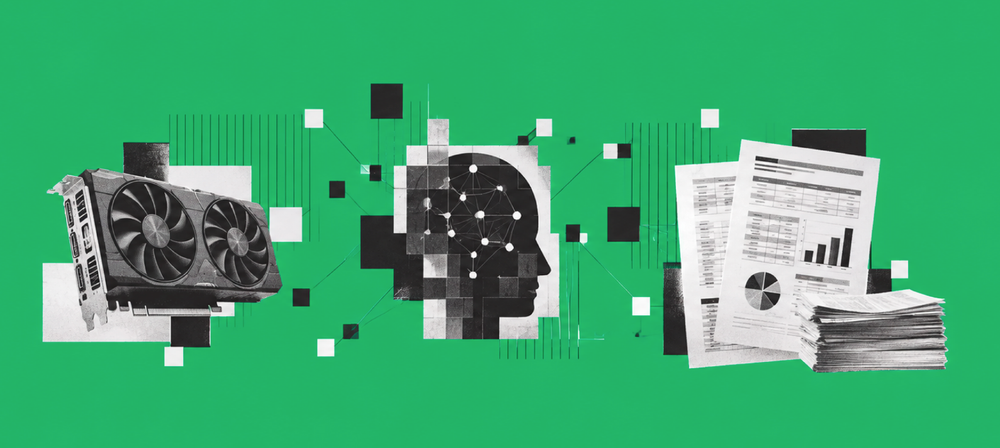
Can a ~$500 consumer GPU reliably extract financial statements using local, open models?
Running open models locally on a midrange AMD Radeon with Ollama.
Financial platforms spend thousands on cloud vision and parsing APIs to turn receipts, invoices, and bank statements into structured JSON. They also spend a lot of time arguing with legal about uploading client documents to someone else's GPU.
We wanted to answer a more practical question.
Can a ~$500 consumer GPU on a normal desktop do this job locally, with open models, well enough that you would actually use it?
Not a toy receipt. Real bank and credit card statements. Scanned PDFs and a screenshot. Account details plus every transaction row, including debit versus credit.
The short answer: sometimes for overnight jobs on scanned PDFs. Not yet for messy screenshots. And not if you just pick the fastest model.
The most important result was also the easiest to miss:
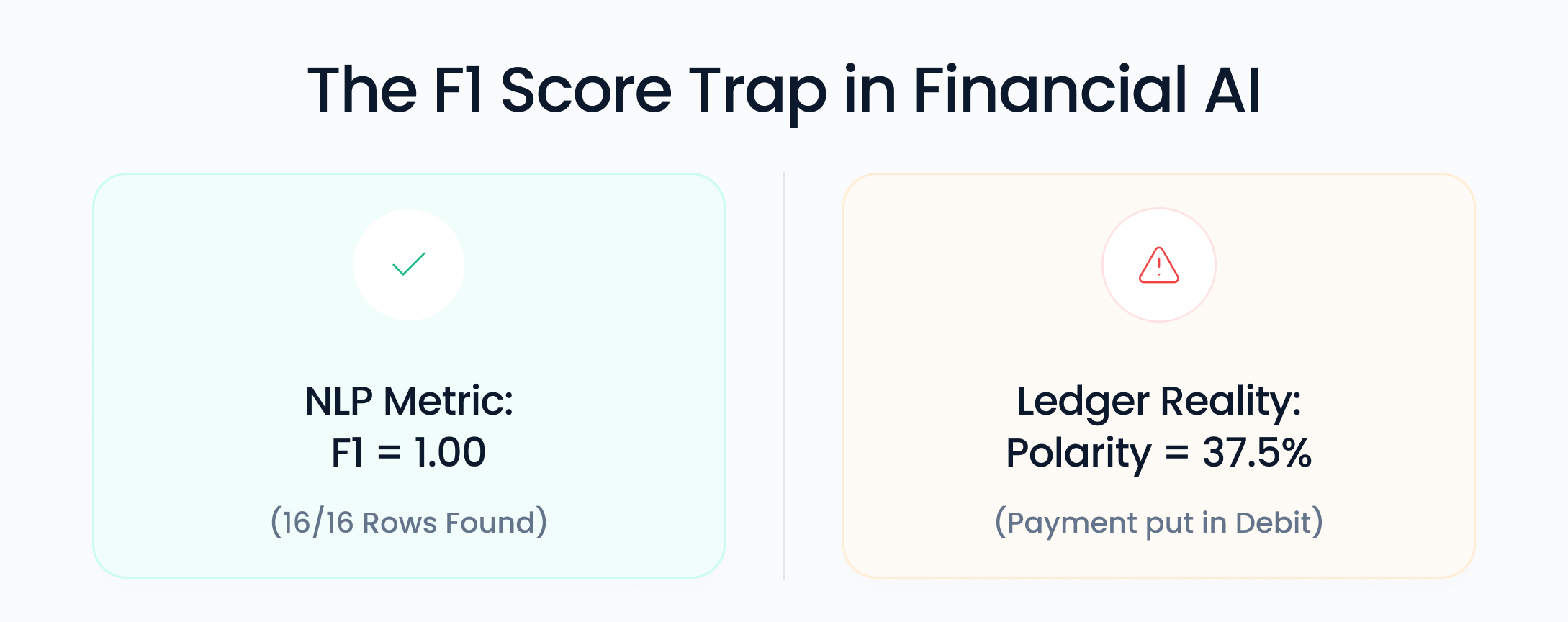
One run found every transaction in a credit card statement. F1: 1.00. It classified debit versus credit correctly only 37.5% of the time. For a generic document benchmark, that can look successful. For finance, it produces the wrong ledger.
That distinction, finding a row versus understanding what the money did, is the story of this experiment.
This is not a comparison between local models and cloud services. We did not run GPT, Gemini, Claude, or a document parsing API on the same files, so this post does not claim that local models beat or replace them. It asks the narrower question this experiment can actually answer: how reliable can private, asynchronous financial extraction be on a roughly $500 consumer GPU?
TL;DR
Hardware: RX 7800 XT 16 GB, Ryzen 5 7600X, 32 GB RAM, Windows, Ollama.
Pipeline: OCR → local text LLM → Pydantic JSON. No vision models in this round.
Turn Gemma 4 thinking off for extraction. Default thinking caused 300-second timeouts and made the model appear far slower than it really was. Withthink: false, it held ~43 tokens/s.
18 runs: 3 documents × 3 models × 2 OCR backends, scored against hand-labeled JSON.
Fastest:qwen3.5:9b(~62 tokens/s, ~45 s), but substantially weaker on financial polarity.
Most consistent: gemma4:12b (avg F1 0.884, polarity 0.805).
Perfect card PDF: qwen2.5:14b + Tesseract (F1/amount/polarity 1.00) at ~211 s LLM time.
Perfect bank PDF: Gemma or Qwen 2.5 + LiteParse (amounts 100%). Tesseract found the rows and got 12.5% of amounts right.
Screenshots are the hard case: best amount accuracy 57%.
In this small experiment, local 12–14B models were credible for private, overnight extraction of clean scanned financial statements — provided the output was validated beyond row detection. That is not evidence that they replace cloud APIs generally.
The rest of this post is what actually happened on our test machine.
The machine
This is not a datacenter box. It is a gaming PC.
| Component | Specification |
|---|---|
| GPU | AMD Radeon RX 7800 XT 16 GB |
| CPU | Ryzen 5 7600X |
| RAM | 32 GB DDR5 @ 6000 MHz |
| OS | Windows |
| Runtime |
Ollama
on localhost:11434
|
| OCR | Tesseract 5 + optional LiteParse |
We did not use vision models for this round. Gemma 12B in Ollama is a text model. Feeding it a PNG would have tested the wrong thing.
We kept the pipeline deliberately simple:
- Get text (from the PDF if it has text, otherwise OCR)
- Ask a local LLM for strict JSON
- Validate with Pydantic, fix broken JSON if needed, then score against labels we created by hand
That keeps the experiment focused on OCR + text-model extraction, rather than mixing in the capabilities of a vision model.
What we asked the model to extract?
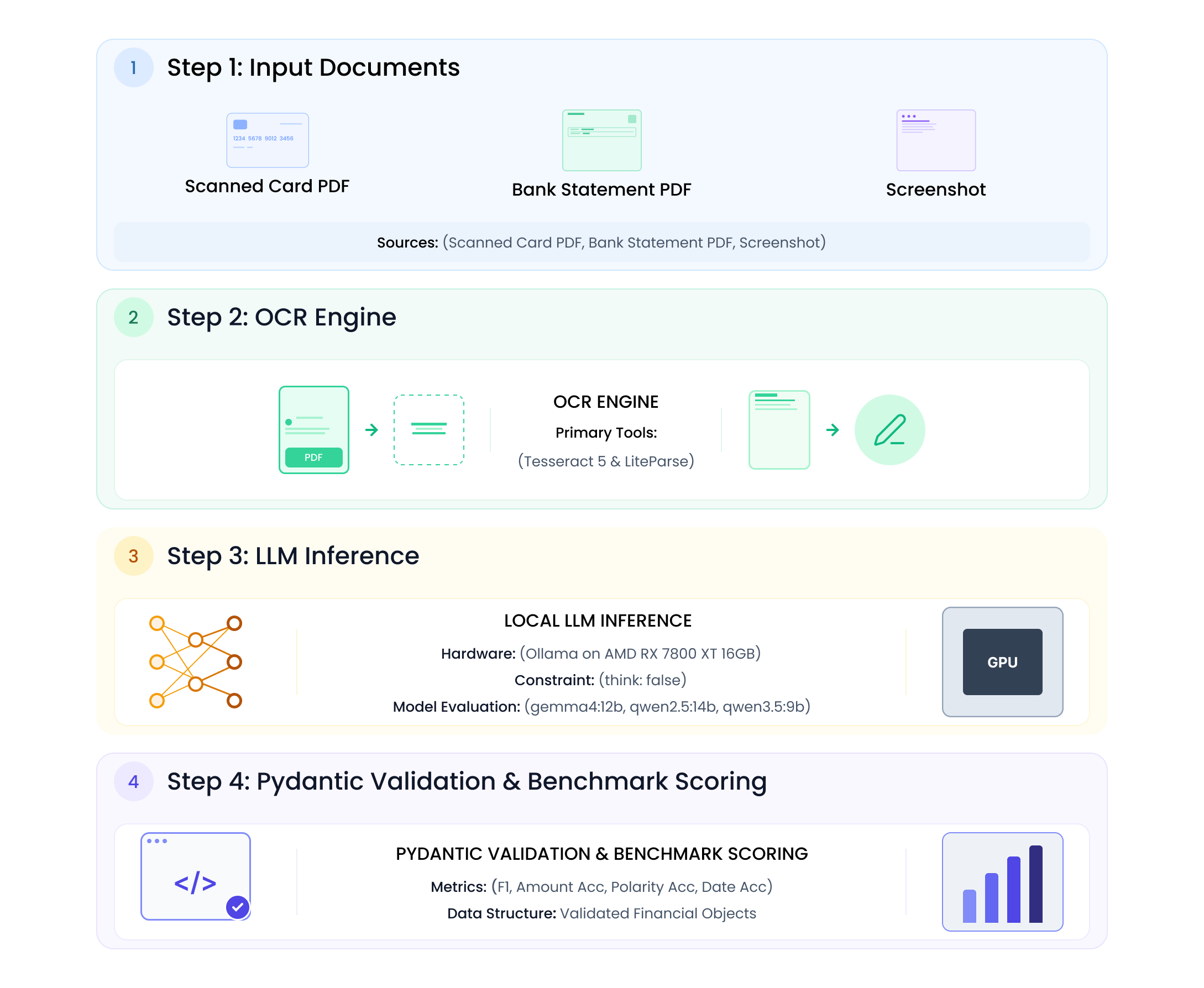
We weren't asking the model to “summarize this statement.” We wanted structured financial data that could actually be used in a spreadsheet or downstream system.
{
"account": {
"bank_name": "string or null",
"account_holder": "string or null",
"account_number_masked": "string or null",
"account_type": "string or null",
"currency": "USD",
"statement_period": {"start": "YYYY-MM-DD", "end": "YYYY-MM-DD"},
"opening_balance": 0,
"closing_balance": 0
},
"transactions": [
{
"date": "YYYY-MM-DD",
"description": "string",
"debit": 0,
"credit": null,
"balance": null,
"reference": "string or null"
}
]
}
One of debit or credit per row. Never both. Never invent rows.
Documents (personal statements; the numbers below come from those files):
| Alias | What it is | Labeled rows |
|---|---|---|
ccStatement
|
Scanned credit card statement PDF (two-page excerpt) | 16 |
bankStatement
|
Bank / savings statement PDF, lots of transfers, newest first | 16 |
ccImageStatement
|
Screenshot of page 1 of the same credit card statement | 14 |
We tested three models across two OCR pipelines and three document inputs: 18 runs in total.
| Role | Ollama tag | Why we included it |
|---|---|---|
| Default |
gemma4:12b
|
Fits 16 GB |
| Also tried |
qwen2.5:14b
|
Similar size, often good at following JSON instructions |
| Also tried |
qwen3.5:9b
|
Newer, smaller, faster |
What counts as correct?
Financial extraction cannot be evaluated with a single score. We treated it as four separate questions:
Row detection (F1) → amount accuracy → polarity accuracy → date accuracy
For each predicted transaction, we matched it to a labeled row using its normalized date and description. F1 is the harmonic mean of precision and recall over the matched row set; it says whether the model found the right rows, not whether the fields inside them are right. An amount counted as correct when the normalized numeric value matched the label exactly. Polarity counted as correct when the non-null side, debit or credit, matched the label. Dates were exact YYYY-MM-DD matches.
We created labels for 46 transaction rows: 16 from the card PDF, 16 from the bank PDF, and 14 from the screenshot. Card PDF labels came from the clearer statement text and totals. Bank amounts were reconstructed from running balances where OCR on the second page was unusable. The screenshot was labeled from the clearer underlying PDF because the image itself was too broken to trust as a human source.
That makes this a useful engineering test, not a general benchmark. It is only two underlying statements plus a screenshot of one of them, one consumer GPU, three local text models, two OCR pipelines, temperature 0, and no vision model or cloud baseline.
Experiment 1: Gemma Wasn’t Slow - It Was Thinking
On our first real run, Gemma timed out on page 2 of a statement. HTTP 300 seconds. Qwen 2.5 on the same PDF finished fine.
We assumed the 12B model was just too heavy for a 7800 XT.
It was not.
gemma4:12b thinks by default. Before it writes JSON, it writes a reasoning block. On a dense OCR page, that reasoning phase can use up the entire timeout. Qwen 2.5 does not think that way, so it looks "faster" even though it is a larger model.
A tiny JSON test on the same box:
| Model | Setting | Time | Thinking |
|---|---|---|---|
qwen2.5:14b
|
default | ~12 s | none |
gemma4:12b
|
default (think on) | ~17 s | ~194 chars, and growing on real pages |
gemma4:12b
|
think: false
|
~0.7 s | none |
On a real two-page card PDF, Gemma with thinking enabled spent ~212 s in the LLM. Qwen spent ~48 s.
Fix: send think: false in the Ollama /api/chat payload.
payload = {
"model": model,
"stream": False,
"format": "json",
"think": False, # extraction does not need a chain of thought
"options": {"temperature": 0.0},
"messages": [...],
}
After that, Gemma held a steady ~43 tokens/s on this GPU. What initially looked like a model-performance problem turned out to be a configuration problem.
If you are benchmarking a reasoning model for JSON extraction, turn thinking off. Otherwise, you are partly measuring reasoning overhead rather than extraction performance.
Experiment 2: Fast Extraction, Wrong Financial Meaning
Same OCR text. Two models.
Gemma marked card purchases as debit and the statement payment as credit.
Qwen 2.5 marked everything as debit, including the payment.
That is the mistake that actually matters. A missed coffee shop row is annoying. A 7,175.26 payment classified as spend is a broken ledger.
OCR was not the problem. Both models saw the same Tesseract text. This was the prompt.
This is where financial semantics get tricky. ‘Debit’ and ‘credit’ do not simply mean money out and money in, especially once you move between bank accounts and credit cards.
We made the system prompt very explicit:
Credit card statements:
- debit = purchases / fees / interest that INCREASE the amount you owe
- credit = payments / refunds / reversals that REDUCE the amount you owe
(PAYMENT, ACH, wire, CR, payment received)
- Opening balance and "total amount due" are NOT transactions
- Never put a card repayment into debit
After that, all three models started tagging the card payment as credit on the card PDF. It was not specific to Gemma. It still was not free: qwen3.5:9b later flipped a pile of purchases to credit when the OCR was Tesseract.
If you care about debit vs credit, write it in the prompt and score it. Do not assume the model will guess.
Experiment 3: 18 Runs Across Models, OCRs and Documents
Once thinking was off and the prompt was clear about cards, we ran the full benchmark.
- Docs: card PDF, bank PDF, card screenshot
- Models: Gemma 4 12B, Qwen 2.5 14B, Qwen 3.5 9B
- OCR: Tesseract (PyMuPDF render at 300 DPI) versus LiteParse (keeps more layout, with Tesseract doing the underlying OCR)
Each run writes two files:
- outputs/<doc>__<model>__<ocr>.json
- outputs/<doc>__<model>__<ocr>.metrics.json (OCR ms, char count, LLM ms, tok/s, debit/credit counts)
Then we scored each run against the labeled JSON. In the tables below:
- F1: did we find the right set of rows (no misses, no extras)? It does not mean the numbers inside the row are correct.
- Polarity: whether the transaction was assigned to the correct debit or credit field — for example, distinguishing a card purchase from a repayment.
- Amount: is the figure actually right?
- Date / pred vs ideal / tok/s: date match, extra or missing rows, and speed (not quality).
A model can achieve perfect row-level F1 and still be financially wrong.
Perfect F1, Wrong Ledger
Two card PDF runs found all 16 rows but got polarity right only 37.5% of the time. One was qwen3.5:9b with Tesseract; the other was qwen2.5:14b with LiteParse. Their output looked complete. Their ledgers were not.
Here is the failure in miniature:
Statement
PAYMENT RECEIVED 7,175.26
OCR output
7.17526
LLM output
{"debit": 7175.26, "credit": null}
Correct ledger
{"debit": null, "credit": 7175.26}
These are two completely different failures. One is numeric extraction; the other is financial interpretation. Row-level F1 exposes neither. Neither is visible in row-level F1. This is why the rest of the article reports amount and polarity beside detection rather than hiding them inside one headline number.
Speed: Fast Enough for Batch, Not Yet for Interactive Use
Averages across the six runs per model (three docs × two OCR backends).
| Model | Avg tokens/s | Avg LLM time | Notes |
|---|---|---|---|
qwen3.5:9b
|
62.0 | ~45 s | Fastest. Uses the least VRAM. |
gemma4:12b
|
43.4 | ~62 s | Same tok/s on every doc. Easy to predict. |
qwen2.5:14b
|
12.1 | ~147 s | Much slower on this GPU, without a consistent accuracy advantage. |
Total time is OCR + LLM. OCR is not the slow part.
| OCR backend | Avg OCR time | Avg characters extracted |
|---|---|---|
| Tesseract | 2.0 s | ~4.1k |
| LiteParse | 3.2 s | ~7.7k |
LiteParse preserves substantially more layout information. That helps with dense bank-statement columns, but it also introduced damaging numeric errors in some cases.
LLM times we recorded for the card PDF with Tesseract:
| Model | LLM time | Tokens/s | Rows found |
|---|---|---|---|
qwen3.5:9b
|
44 s | 64.9 | 15/16 |
gemma4:12b
|
54 s | 43.4 | 16/16 |
qwen2.5:14b
|
211 s | 9.6 | 16/16 |
At these speeds, local inference is difficult to justify for an interactive experience where the user is waiting for the statement to be parsed.
For a private overnight batch, however, roughly a minute per statement can be entirely reasonable.
OCR: More Text Does Not Mean Better Financial Data
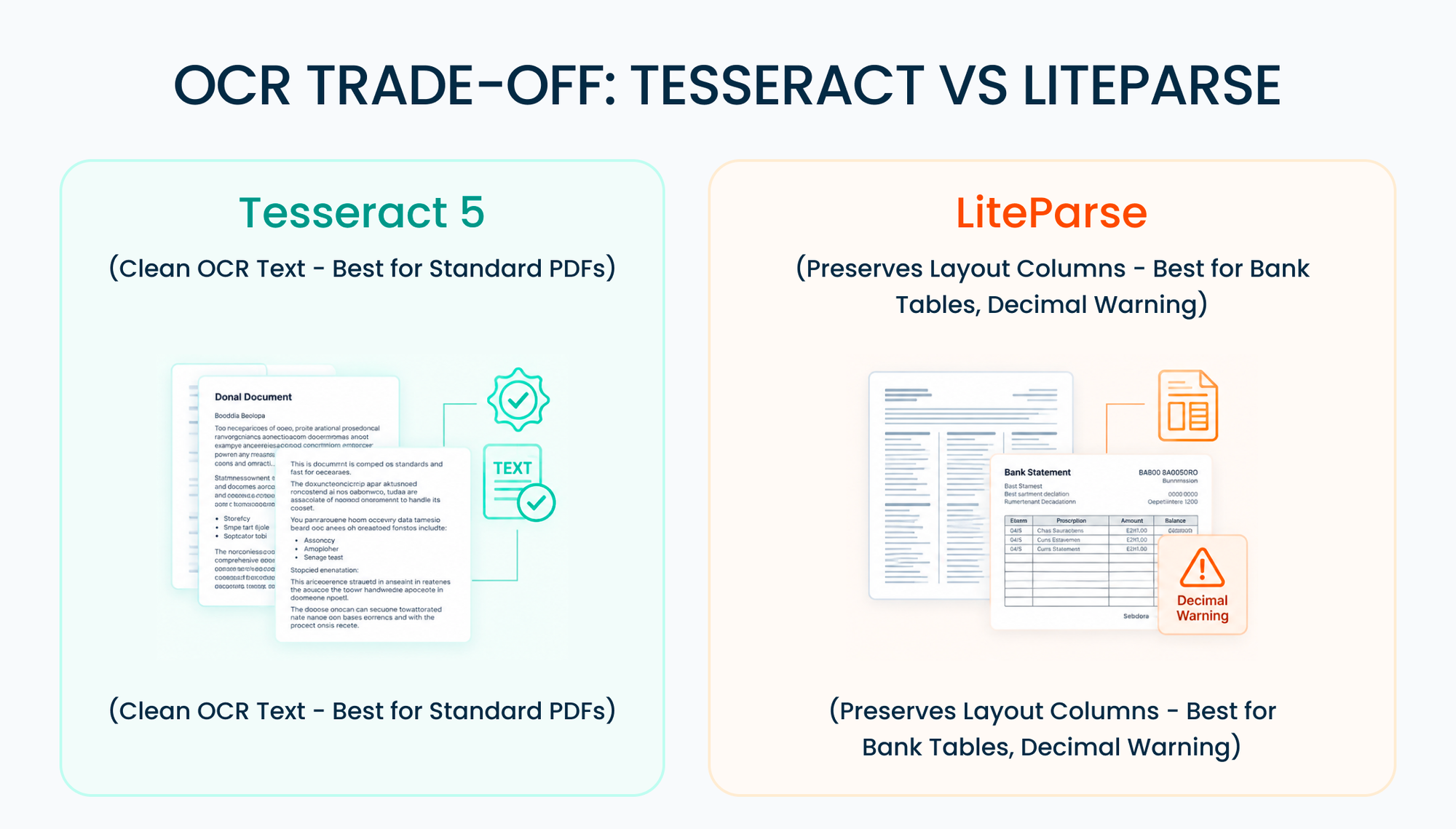
More OCR text ≠ better financial data. LiteParse produced roughly 7.7k characters versus Tesseract's 4.1k on average. That extra layout helped the bank statement, but on the card PDF it helped turn 7175.26 into 7.17526. In finance, a tiny OCR error can be semantically catastrophic while the surrounding paragraph remains perfectly readable.
LiteParse extracted almost twice as many characters on average. On the bank PDF, that additional structure mattered: the debit, credit and balance columns survived well enough for the models to interpret them correctly. Gemma + LiteParse and Qwen 2.5 + LiteParse both hit F1 1.00, amount 100%, polarity 100% on 16/16 rows.
Tesseract on the same bank PDF still found the rows (F1 0.97–1.00) but amount accuracy fell to 12.5%. The model could still identify the transactions and their debit/credit positions, but the numeric fields were too damaged for reliable amount extraction. We had already seen this while labeling: page 2 amounts were wrong, so the labels used balance math (opening 52612.74 + credits − debits = closing 55557.75).
On the card PDF, Tesseract won. Cleaner numbers. Qwen 2.5 + Tesseract: F1 1.00, amounts 100%, polarity 100%. Gemma + Tesseract: F1 1.00, amounts 100%, polarity 94% (one polarity miss).
LiteParse on the card PDF had a nasty number bug: 7175.26 showing up as 7.17526. Extra layout text, broken decimals. Gemma still found every row (F1 1.00) but polarity dropped to 75% because some CR/DR columns got confused.
OCR averages across all models and docs:
| OCR | F1 | Amount accuracy | Polarity accuracy |
|---|---|---|---|
| LiteParse | 0.935 | 0.744 | 0.755 |
| Tesseract | 0.777 | 0.383 | 0.663 |
Read that table with the documents in mind. LiteParse's average looks better because of the bank PDF and the screenshot. Tesseract's average looks worse because of the screenshot and the bank amount OCR.
What we would actually use: start with Tesseract on relatively clean scans, and try LiteParse when the page has tight debit/credit/balance columns.
One OCR won on the card PDF, the other won on the bank PDF, so there is no single "best OCR" in this test.
Gemma Wasn’t the Fastest — But It Was the Most Reliable
Model averages across all six of each model's runs:
| Model | F1 | Amount accuracy | Polarity accuracy |
|---|---|---|---|
gemma4:12b
|
0.884 | 0.628 | 0.805 |
qwen3.5:9b
|
0.850 | 0.530 | 0.640 |
qwen2.5:14b
|
0.833 | 0.533 | 0.682 |
Best combo per document:
| Document | Winner | F1 | Amount | Polarity |
|---|---|---|---|---|
| Card PDF |
qwen2.5:14b + Tesseract
|
1.00 | 1.00 | 1.00 |
| Card PDF (close 2nd) |
gemma4:12b + Tesseract
|
1.00 | 1.00 | 0.94 |
| Bank PDF |
gemma4:12b + LiteParse
|
1.00 | 1.00 | 1.00 |
| Bank PDF (tie) |
qwen2.5:14b + LiteParse
|
1.00 | 1.00 | 1.00 |
| Card screenshot |
gemma4:12b + LiteParse
|
0.96 | 0.57 | 0.79 |
On the clean scanned PDFs in this test, the best local 12–14B configurations could recover every transaction and get the amounts and financial polarity right.
The screenshot was a different story. Even the best run recovered only 57% of amounts correctly, despite an F1 of 0.96. The model could still find most of the transactions; it simply could not reliably read the money. That is not production-ready.
The full scoreboard
Percentages are vs labeled row count.
| Document | Model | OCR | F1 | Amount | Polarity | Date | Predicted / expected |
|---|---|---|---|---|---|---|---|
| Bank | gemma4:12b |
LiteParse | 1.000 | 1.000 | 1.000 | 1.000 | 16/16 |
| Bank | qwen2.5:14b |
LiteParse | 1.000 | 1.000 | 1.000 | 1.000 | 16/16 |
| Bank | qwen3.5:9b |
LiteParse | 0.968 | 0.812 | 0.938 | 0.875 | 15/16 |
| Bank | qwen2.5:14b |
Tesseract | 1.000 | 0.125 | 1.000 | 0.500 | 16/16 |
| Bank | gemma4:12b |
Tesseract | 0.970 | 0.125 | 1.000 | 1.000 | 17/16 |
| Bank | qwen3.5:9b |
Tesseract | 0.625 | 0.250 | 0.438 | 0.500 | 16/16 |
| Card PDF | qwen2.5:14b |
Tesseract | 1.000 | 1.000 | 1.000 | 1.000 | 16/16 |
| Card PDF | gemma4:12b |
Tesseract | 1.000 | 1.000 | 0.938 | 1.000 | 16/16 |
| Card PDF | gemma4:12b |
LiteParse | 1.000 | 1.000 | 0.750 | 1.000 | 16/16 |
| Card PDF | qwen2.5:14b |
LiteParse | 1.000 | 1.000 | 0.375 | 0.938 | 16/16 |
| Card PDF | qwen3.5:9b |
LiteParse | 1.000 | 0.812 | 0.875 | 1.000 | 16/16 |
| Card PDF | qwen3.5:9b |
Tesseract | 0.968 | 0.875 | 0.375 | 0.812 | 15/16 |
| Card image | gemma4:12b |
LiteParse | 0.963 | 0.571 | 0.786 | 0.786 | 13/14 |
| Card image | qwen3.5:9b |
LiteParse | 0.846 | 0.429 | 0.643 | 0.571 | 12/14 |
| Card image | qwen3.5:9b |
Tesseract | 0.696 | 0.000 | 0.571 | 0.000 | 9/14 |
| Card image | qwen2.5:14b |
LiteParse | 0.636 | 0.071 | 0.429 | 0.286 | 8/14 |
| Card screenshot | gemma4:12b |
Tesseract | 0.370 | 0.071 | 0.357 | 0.071 | 13/14 |
| Card image | qwen2.5:14b |
Tesseract | 0.364 | 0.000 | 0.286 | 0.000 | 8/14 |
The full scoreboard reinforces the central finding: row detection alone is not a sufficient financial benchmark. F1 can be perfect while amount or polarity accuracy is poor.
What ‘Correct’ Actually Looks Like
Anonymized, from the card PDF with Tesseract after the prompt fix. The important part is the transaction shape:
{
"date": "2025-02-11",
"description": "Payment received",
"debit": null,
"credit": 7175.26
}
That payment row is the whole point of the blog. If it lands in debit, the pipeline is not ready.
Bank statements had a cleaner check. The transfer list was newest first, with a running balance on every row. Once the OCR columns were good, the numbers added up:
52612.74 + 15072.50 − 12127.49 = 55557.75
We still would not use balance_check_ok as the main score. Credit card EMI conversions do not follow previous + purchases − payments = amount due. A balance check is a sanity signal, not the benchmark.
A few pipeline details
We send one page at a time. A 12–14B model on 16 GB does not want a 20-page statement in one prompt. The last 5 transactions from the previous page go along as context so it does not repeat them.
Ollama returns JSON, then Pydantic checks it. If the JSON is broken, we send it back once with an instruction to fix the structure while preserving debit versus credit.
Numeric normalization handles differences such as 7,175.26 versus 7175.26. It cannot safely repair an OCR error such as 7.17526; that requires additional validation.
We logged OCR time, LLM time, tokens/s, and debit/credit counts separately. If we only published tokens/s, Qwen 3.5 wins. If we only published F1 on the card PDF, almost every model looks done. The useful split is amount, polarity, and document type.
What would we actually deploy?
| Situation | Decision from this test | Why |
|---|---|---|
| Clean scanned PDFs + overnight processing | Local is viable, with validation | The best PDF runs reached complete rows, amounts, and polarity. |
| Dense bank tables | Try OCR that preserves layout | LiteParse preserved enough structure to reach 100% amount accuracy in the best bank runs. |
| Phone screenshots | Not production-ready | The best image amount accuracy was only 57%. |
| Interactive/chat experience | Use a faster service or accept the wait | Local LLM time was roughly 45–60 seconds per document. |
| Privacy-sensitive batch workloads | Strong local use case | Documents stay on the machine in this pipeline. |
| High volume where cost matters | Measure before deciding | This experiment recorded no electricity bill, cloud quote, or pages/month. |
A useful comparison between local and cloud processing is multidimensional: accuracy, latency, cost, privacy, and throughput. We measured accuracy and local latency here. We did not measure a cloud baseline, cost per 1,000 pages, or GPU payback period, so this experiment does not support a claim that local inference is cheaper than using a cloud parser.
For a product that accepts phone screenshots of statements, this pipeline is not ready yet. For a chatbot, 45–60 seconds of local LLM time is a poor interactive experience. For private overnight batches, the constraints are much more favorable.
If we had to choose a starting configuration based only on these tests:
| Goal | Pick |
|---|---|
| Default |
gemma4:12b, think: false, Tesseract, LiteParse when tables are dense
|
| Best card PDF polarity in this set |
qwen2.5:14b + Tesseract (and wait ~3–4× longer)
|
| Do not use as the only model |
qwen3.5:9b
|
| Image / screenshot path | Needs better OCR or a vision model. Text LLM on Tesseract is not enough. |
None of these results imply that cloud APIs are worse. A real comparison would run one or two of them on the same documents and report the same four accuracy dimensions alongside latency, price, and data handling. What this experiment does show is narrower: a consumer GPU can already be a credible option for privacy-sensitive, asynchronous financial-document extraction.
Conclusion
In this small experiment, local 12–14B models running on a consumer GPU were accurate enough to make asynchronous extraction of clean scanned financial statements genuinely viable. But the result depended heavily on OCR quality, and the output had to be validated beyond row-level F1. Screenshots remained much less reliable, and the polarity failures showed why complete-looking JSON is not the same thing as correct financial data.
The conclusion is not that local models have solved financial document parsing. They haven't. It is that a roughly $500 consumer GPU is already capable enough to make private, asynchronous extraction of clean financial statements genuinely interesting.
A larger benchmark with more document types, more institutions and matched cloud baselines would tell us how far these results generalize.
But this experiment already exposed something more fundamental about evaluating financial AI:
Finding every transaction is not enough. The ledger has to be right.